Showing posts with label Photoshop Tutorial. Show all posts

Tuesday, December 13, 2016

Photo Resize and Remove Background Tutorial Upon Upwork Project

Photo Resize with Background Transparent is one of the Most Essential part for Photo Editing. If anyone want take this as profession at first need to analysis the project which must need to know for proposal Submission.

Now we are trying to analysis one project of Upwork.

Project Name: Resize and remove background of 5 pictures - Quick job

What are the Main Requirements the project have?

- Remove background
- So transparant background
- rezised to 1920x1440px
- Max. 72 dpi
- PNG format with transparency
- Optimal compression max. 3MB
- slight shadow (see example)

According to the Instruction if anyone want to submit a proposal first need to now very well for Clipping Path and in Photoshop Pen tool is one of the best tool for Manual Clipping Path

Now we have discussed step by step how we have complete this according to Instruction

1. Open the Test image in Photoshop

Photoshop Clipping Path


2. Create Clipping Path Outside of the Edge of main Object with photoshop pen tool

Clipping path for cutting Edge


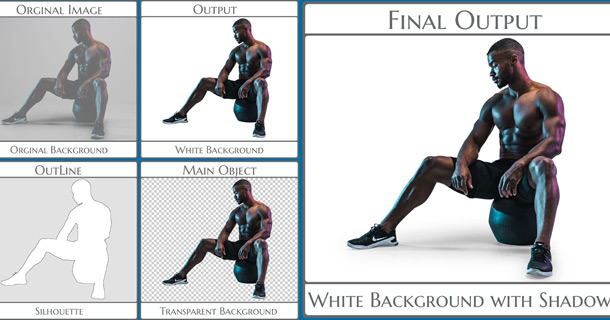
3. Then Remove Background with Adding a small Shadow and Size of the Main object increase 1820x1340px

New background with Clipping Path

4. Then we will increase the Size of the Background According to instruction 1920x1440px and also check the Shadow which need to Slight and check this with different Background. Here I am using Red.


Red Background Replace Old after clipping path


5. Final Output Make this transparent by closing the Eyes of the Background Layer. Save as Web and Select the PNG 8 or 24 otherwise its size will not reduce and also will not get Resolution DPI 72.


Resized Transparent Background with shadow after Clipping Path

Now we are getting the final Output.

How we are now think, if we want to send proposal must need to think 3 essentials

1. Will I able to give best quality. if not must need to practice 1 Month.
2. Within very short time need to send proposal after published the project
3. Essential Documents must need to attached for proving yourself as I am the best.

I think it will be very Appreciate to the project publishers. Know more feel free to send Massage to
photoshopclippingmask@gmail.com


Sunday, July 26, 2015

Why Ghost Mannequin Remove use Clipping Mask in Photoshop

Clipping Mask is used for Background Remove and also Remove Ghost Mannequin. When a Photographer shot a cloth photo need to use  Mannequin for Standing as a Raw Photo.

When the Cloth photo is used for Sell in Online Shop need to look professional. Quality Photo Editor need to remove the Mannequin and Background. Photoshop Clipping Mask is the best way to remove the Background and also Mannequin and add new Background also Neck or back part Sample work

Thursday, July 3, 2014

Why Photoshop Clipping Mask used for Color Separation

Photoshop Clipping Mask is now provides a Vital Role in Photo Editing like Color Separation. A Photographer when take photo for a Cloth or Any how is looking as a Raw Image, Very Unprofessional Looking within the original Background. In case of Cloth if we think, what is happening, From One Cloth, Need to Create Different Colors.   


Think when a Shirt need to sell what will happen. There have different colors for same size. if anyone want to capture all colors shirts photograph cost will be high but when from one Shirt to create different colors must cost will be reduce and will be professional Looking. For Different Colors Looking the first step is Clipping Mask for the specific Cloth which need to different Colors.

Example of Color Separation with Photoshop Clipping Mask


Color Separation with Clipping Mask


Some of the Cloths have different colors and every color will be changed for on line Presentation. So need different Looking, Color Separation Come In front that time. It is very difficult to process and First need to Clipping Maskfor every Separate Color in the Cloth and it may be 5 to 10.

Cloth, Shoe, Toy which has so many colors need to Color Separation. Clipping Mask with Photoshop Pen tool, Eraser Tool, Layer Mask and Alpha Mask use to Quality Color Separation. 

There are Lots of Tools, Software, and Online Editing Add-ons Come in front but if need Quality, Must need to Hand Made Quality Manual Clipping Mask. 

All over the world, Lots of Firm provides Clipping Mask Services. Quality and Turnaround Time are same only differ from price. From Bangladesh, Photoshop Clipping Mask Provide Cost Effective Price compare with Level of Complexity. 


Thursday, May 29, 2014

Why Clipping Path Alpha Masking Essential for Background Remove


Clipping Path and Alpha Masking are the best process for Manual Background Remove. Today world is very first and change come within short time. So with that Background Remove of an images is very easy and Lots of tools are used for free from Object it can be Online or Magic tools.

When Come in front of Problem. The image is high Resolution, Need to use Big Size Banner. In Normal Eyes we cant see any thing and easily remove background but when it Zoom 300% or more then come why need clipping path and Alpha Masking Needed.


Clipping Mask with Background Whitewash

Clipping Mask with Background Transparent

Complex Clipping Path with Alpha Masking

Complex Clipping Path with Alpha Mask

Background Remove with Color Enhancement

Some times Content cant easily Focus on key part but an Image can done that Very Easily. Want Come from different sides but for Quality Image Processing without Clipping Path and Alpha Mask Unbelievable.

Wednesday, May 28, 2014

Why Photoshop Clipping Mask Important for Photographer

Photoshop Clipping Mask is very essential for a Photographer.  When from Raw Image to Final Output of an Image for a Professional Photographer must need looking Attractive. When an Organization hire a Photographer for Capture their Product Photo, First check the qualification and skill of Photo Capture. When anyone present the high quality photo Output within Specific time frame by the use of Photoshop Clipping Mask, The Online Shop Owners select the Photographer to capture the Photos.

There are Online Market place is Available and Photographers are now the Key Person to give High quality Photo looks. If we visit one Online Shop as like woman wearing, must see what types of product and color combination are in there. There are use different background and different Shape for looking professional and only for that the products sell increase.

What tools mainly Use for that if we think, we can understand what the Key Part and Only One Manual Technique come in front us that is Clipping Mask with Photoshop.

I am trying to understand why Photoshop Clipping Mask essential with a Single Photo but Different Looking.

photoshop clipping mask

If Photographer has Both Quality of Clipping Mask and Clipping Path with Photoshop Must can able to give 100% Satisfaction to the Owners of Online Shop.

What types of Problem facing a Photographer? 


When a product photo need to capture, Looking dead and very immature. As the product have different Dimensions. Some place has more lighting and also some has small amount, some images has background which is not set up with product. Some places have different Color Combination with bad Shadowing.  

How to solve the photo with professional Looking?


The Photographer must need to use software by which can able to solve the problem and after that all of the photos are used in Online Shop Owners for Selling. Photoshop is the Best software for getting 100% Result where the Problem part is used to Clipping Mask or Clipping Path for Selection of the Position. This Position can be Background Remove, Cutout, Color Change, and White Background. But all images are looking same quality with Professional.

One Photo can make good example why Photographer use Photoshop Clipping Mask for Looking Professional. Only for that I have added a Photo so that anyone can understand why a Raw Photograph need to Professional looking and what primarily use for that.

Thanks in Advance to read the articles why Photoshop Clipping Mask is important for a photographer.  

Thursday, May 8, 2014

Photoshop Clipping Mask is Essential Part of Photo Enhancement

Photoshop Clipping Mask is the Vital Part of Photo Editing for Enhancement. Everyone. For Adding New Background like White, Gradient or Natural must need to free main Object from Old Background. Photo Retouching is needed as an image looks Very Professional, so need to separate the places of the Main Object which need to Touch Up and Clipping Mask is Completed play the vital role with Photoshop. 

For Cutting the Edge or The Exact last part of the Object or which part need to Touch up, Clipping Path for without Hair Related Part and Alpha Mask for Hair Related part need to Use.  
Photoshop Clipping Mask


Why Need Photoshop for Clipping Mask?


There are Lots of Software in Online Based but Photoshop is the Software which is very famous and User Friendly like manually can be done everything with the Tools. Now Photoshop CS6 is very familiar and Update Version. Color Correction with Dust Removing is easily can be done. 
If the Tools of Photoshop can be used properly, any image must be Looks perfect.

Essential Photoshop Clipping Mask Tools and Keyboard Tab
Essential Photoshop Clipping Mask Tools and Keyboard Tab 

What are Essential Tools in Photoshop for Clipping Mask?


Quality Clipping Mask for Touch up an Image must need to best Skill about Tools of Photoshop and also Techniques of how to use. 

The Essential tools are Pen Tool, Eraser Tool, and Move Tool for Clipping Mask and Dust Removing, Unwanted Elements Removing or add something and retouching also use Clone Tool. For Glamour Correction, Spot Removing use Spot Healing Brush Tool.

Some of the keys as Ctrl Tab, Alt Tab, and Space Tab must need to use for Clipping Path.

These are the Preliminary Instruction for Processing Clipping Mask. Next we will discuss about How to do Clipping Path for Background Removing.

Thanks from Photoshopclippingmask Blog for Continuing with Us.


Twitter Delicious Facebook Digg Stumbleupon Favorites More